
By AI and by project
Pick the tool and see everything from it; or browse the repositories detected under ~/Projetos,
with tree, MIME, size and author of the last commit.
Runs 100% on your machine
Local web panel to view and edit everything about the AIs installed on your Mac — opencode, Claude Code, Codex, GitHub Copilot CLI, Gemini/Antigravity and Cursor — globally and inside your projects.
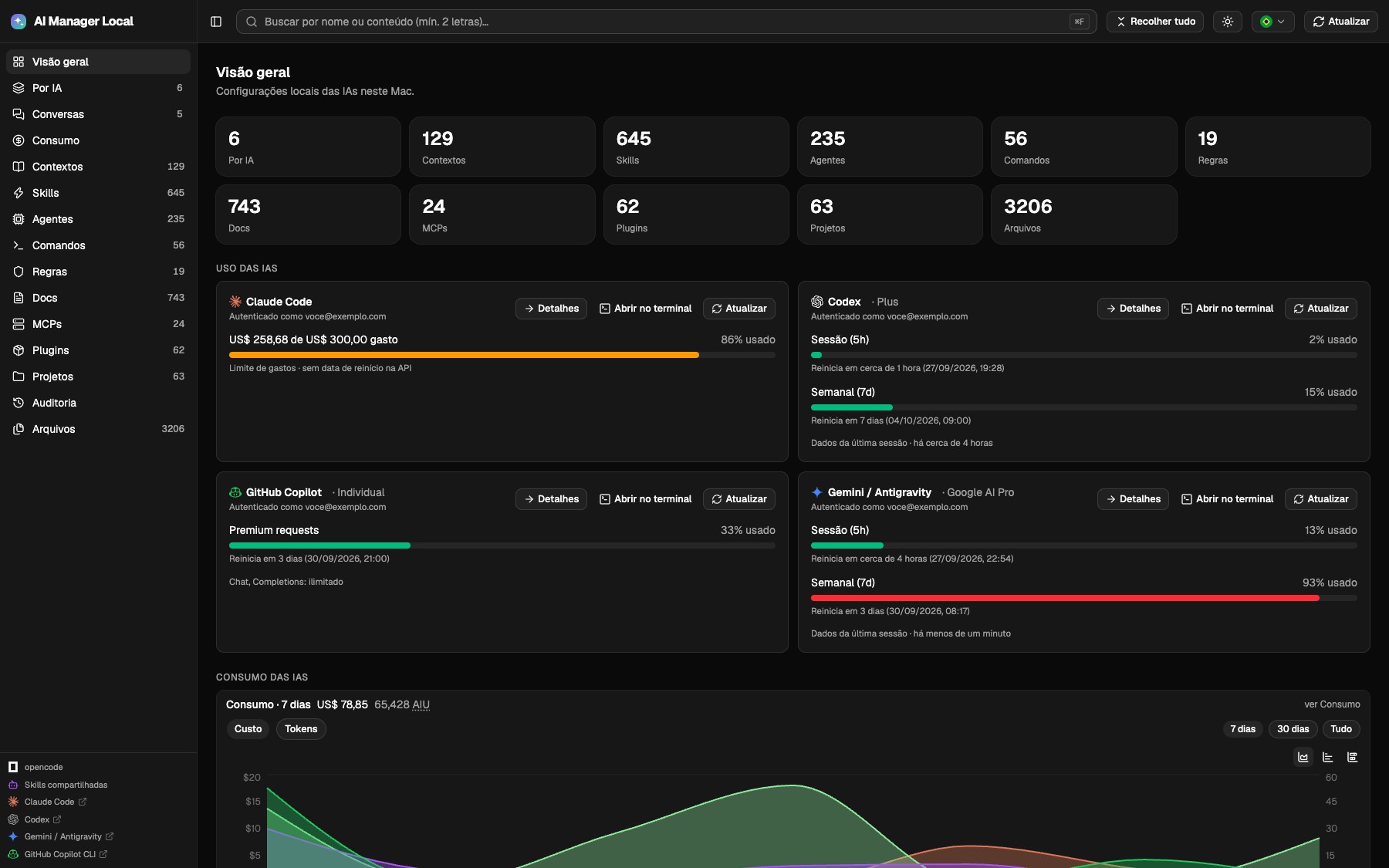
The panel integrates these six AIs and also discovers other tools with a compatible MCP manifest. Usage metrics and actions vary by tool.
 opencode
 Claude Code
 Codex
Codex GitHub Copilot CLI
 Gemini / Antigravity
Skills, agents, commands, rules, MCPs, plugins and configuration files — by artifact type, by AI or by project. With viewer, safe editing and audit.
Pick the tool and see everything from it; or browse the repositories detected under ~/Projetos,
with tree, MIME, size and author of the last commit.
Markdown with Mermaid, JSON, images and Monaco. Automatic backup (10 versions per file), conflict detection if the file changes outside and restore from the interface.
Account limits and reset, cost and tokens read from the local logs — per model, project and day — and the top 20 skills by invocations and context tokens.
Enable and disable MCPs right on the card, authenticate via OAuth and track installed vs. published version, with update and copy of the command to your terminal.
One click opens the CLI in the detected terminal or the native app, right in the project directory — handy to continue exactly where the panel showed you the file.
Track complete session history per AI or project, with token usage, estimated dollar costs, message counts, Top 20 filters, and direct terminal resumption.
Search with ⌘F and line highlighting, global keyboard shortcuts to collapse/expand (⌘A),
light/dark theme (⌘T), refresh (⌘R), sidebar (⌘B), and language (⌘L).
Terminal statusline with token quotas (5h, 7d), context window, accumulated spend, and Git diff for Claude Code and Antigravity. Interactive installer, web preview, and automated backup restoration.
Monitor your AI sessions in real time: tokens consumed, calculated cost per session, Top 20 rankings, project folder grouping, and instant CLI resumption in one click.
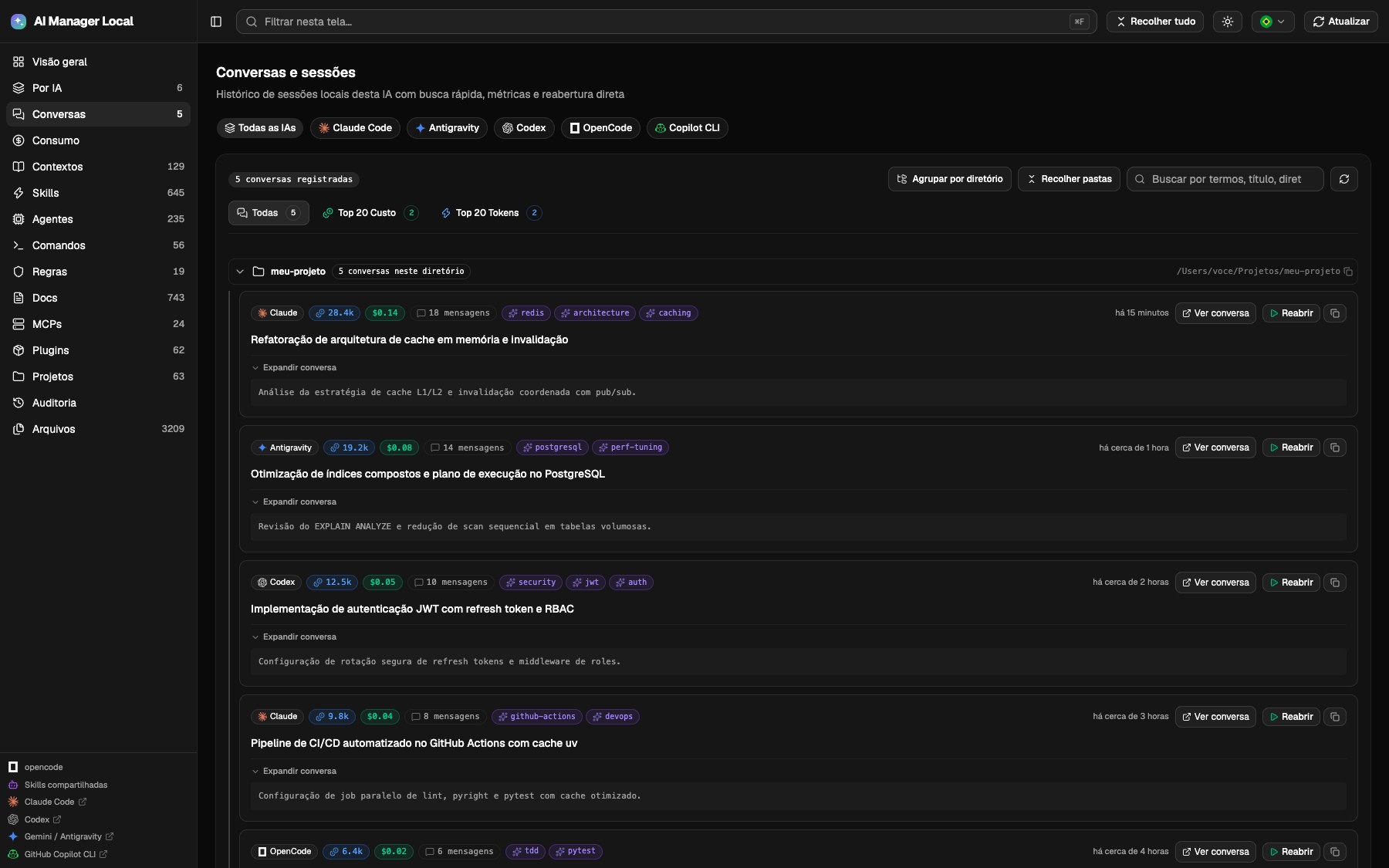
Each session displays the AI badge, estimated USD cost, total tokens, and message count right on line 1, keeping titles clean and clear.
Instantly identify the sessions that consumed the most budget or context tokens, with dedicated filters and rankings.
Sessions grouped automatically by project directory, with one-key shortcut to collapse or expand all folders at once (⌘A).
Expand conversation messages in rich Markdown and copy or execute the native resumption command (--resume) in your terminal.
Monitor AI consumption directly in your terminal in real time and install missing AI assistants using vendor-recommended installation scripts.
Add a sleek status bar for Claude Code and Antigravity (AGY) displaying 5h and 7d quota percentages, context window, spend, and Git status. Install with just statusline with automatic config backup.
The app detects which tools are not yet configured on your machine and suggests official installation commands tailored to your operating system.
Run official commands directly in your terminal or read the official documentation:
Anthropic's autonomous coding agent designed for the terminal.
Google's agentic platform with subagent support and MCP tools.
OpenAI's software engineering agent in the terminal.
Open source coding assistant supporting multiple LLM providers.
GitHub CLI extension for AI command explanations and suggestions.
AI-first code editor built for rapid software development.
Agentic IDE from Codeium designed for real-time collaboration.
AI-powered developer environment with built-in workflow automations.
The backend serves the frontend build at 127.0.0.1:4747. For development with hot reload,
run Vite in parallel (just dev).
gh repo clone mvvitorsilvati/ai-manager-local
cd ai-manager-local

just setup      # deps: uv sync + pnpm install
just start      # frontend build + up at 4747
just statusline # install statusline (Claude/Antigravity)
Without just: cd backend && uv sync, cd web && pnpm install && pnpm build and then
uv run --project backend backend/app.py.
Usage cards only appear with the AI authenticated locally — you log in from the tool itself.
The panel shows what the tools leave on disk. What they do not record, it does not invent.
Opening in the native app, app icons, Finder and Keychain are macOS-only. Outside it the Finder button is disabled with a warning, and opening in the installed terminals is what remains.
Claude Code, opencode, and Antigravity keep that history in local logs. On Codex and Copilot the screen lists the skills that exist on disk, without usage counts.
Cost and tokens come from the logs at list prices, not from your bill. Copilot shows up in AIU, not dollars.
Point AIM_HOME to /mnt/c/Users/<you> to read the Windows side settings.
Windows Terminal is not included in the terminal list.
The panel was made to inspect sensitive files: AI settings, rules and credentials that live on your machine. That is why it sends nothing anywhere.
Nothing exposed on the network by default; the host only changes in a container, by explicit choice.
Backups and audit live in ~/.ai_management_local — on your disk, under your control.
Calls out go only to the official APIs: account limits and usage, versions published on npm and the status pages — with the credentials that already exist on the machine.